

Introduction
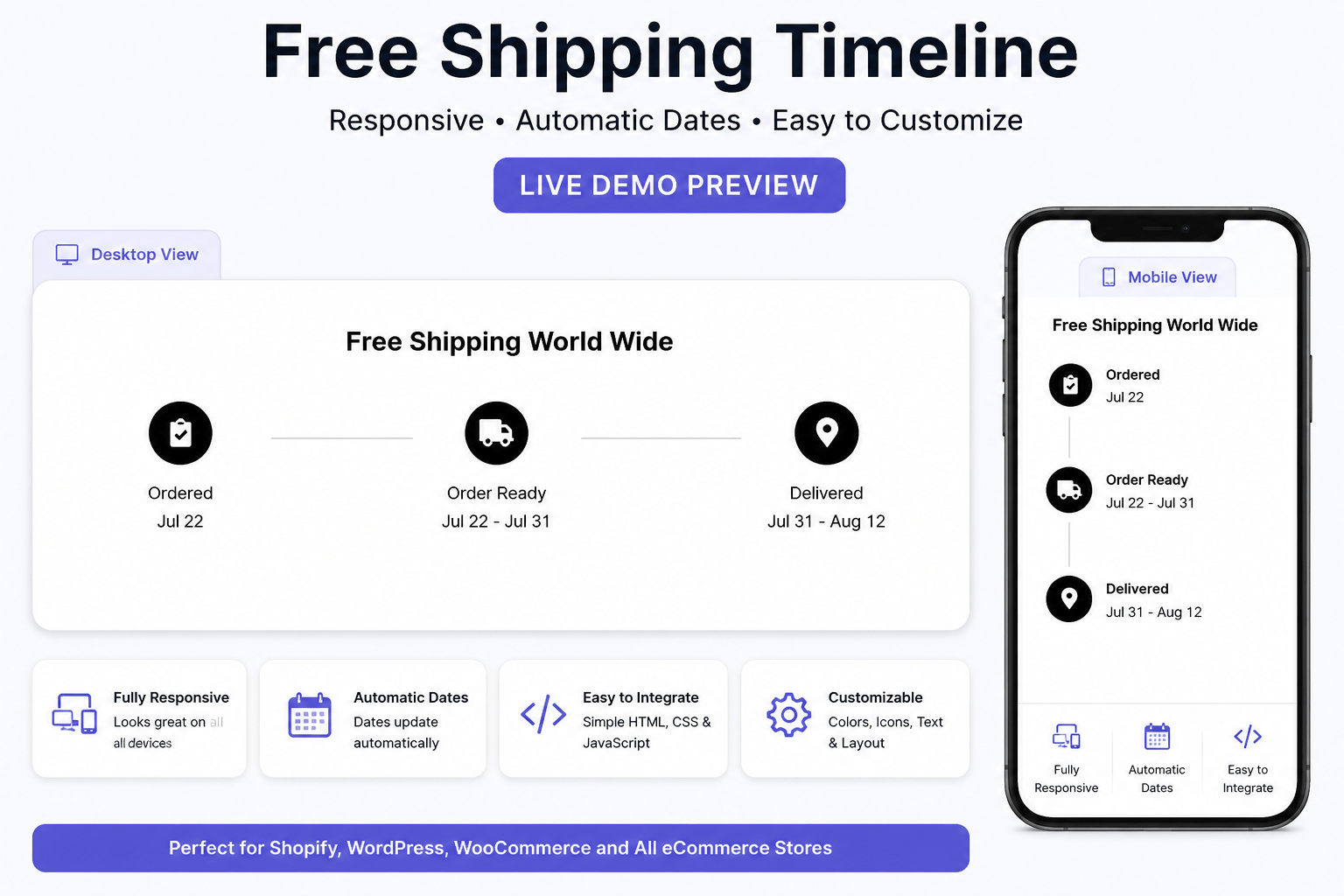
A Free Shipping Timeline is an effective way to motivate customers to increase their cart value by showing how close they are to qualifying for free shipping. It creates urgency, improves the shopping experience, and can help increase average order value. This responsive timeline is built using HTML, CSS, and JavaScript, making it easy to integrate into Shopify, WordPress, or any eCommerce website.
What is a Free Shipping Timeline?
A Free Shipping Timeline is a visual shipping tracker that shows customers the estimated progress of their order from the moment it is placed until it is delivered. It typically includes stages such as Ordered, Order Ready, and Delivered, along with estimated processing and delivery dates.
This feature helps customers understand when their order will be processed and delivered, improving transparency and building trust. A well-designed shipping timeline also enhances the shopping experience by reducing uncertainty and minimizing customer inquiries about order status.
Built using HTML, CSS, and JavaScript, this Free Shipping Timeline is fully responsive and works seamlessly with Shopify, Shopify Plus, WordPress, WooCommerce, and other eCommerce platforms. It automatically calculates estimated dates, supports mobile devices, and can be easily customized to match your store’s branding.
Why Use a Free Shipping Timeline?
- 🚚 Displays estimated shipping and delivery dates
- 📦 Shows order progress in a clear visual timeline
- 📱 Fully responsive for desktop, tablet, and mobile
- 🛍️ Compatible with Shopify, Shopify Plus, WordPress, and WooCommerce
- ⚡ Lightweight HTML, CSS, and JavaScript code
- 🎨 Easy to customize colors, icons, text, and delivery schedules
- 🤝 Builds customer trust and improves the shopping experience
- 📈 Helps reduce support requests about shipping status
- 💰 Increases customer confidence and can improve conversion rates
Whether you’re running a Shopify store, WordPress website, or any custom eCommerce platform, a Free Shipping Timeline is an excellent way to provide customers with clear delivery expectations while creating a more professional and user-friendly shopping experience.
Live Demo
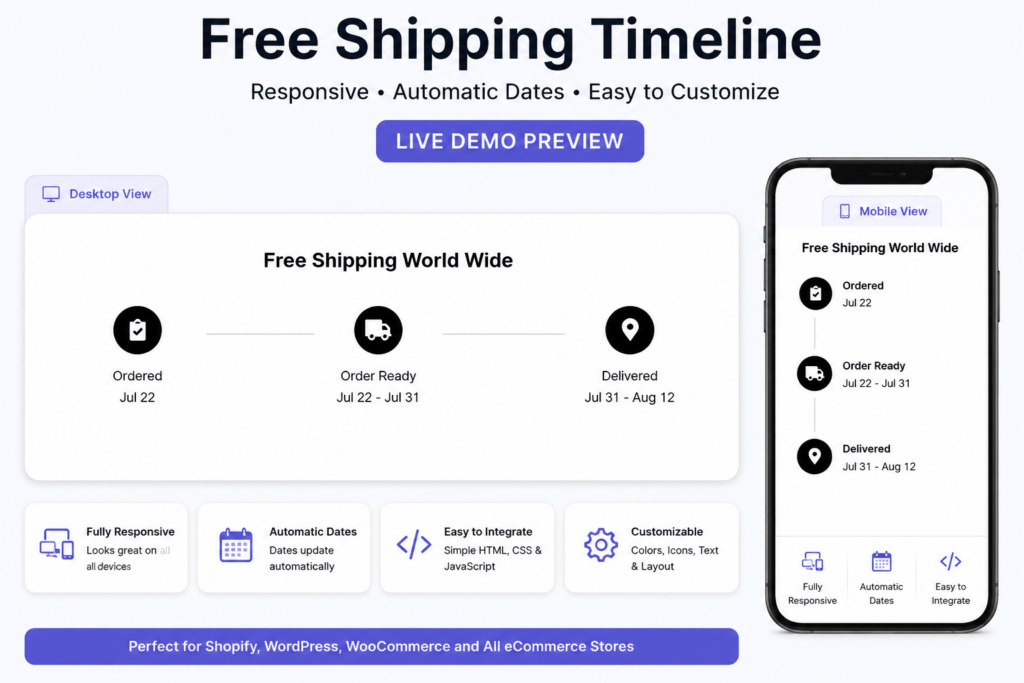
Experience the Free Shipping Timeline in action before adding it to your Shopify or WordPress store. This live demo showcases a clean and responsive shipping timeline that automatically displays estimated processing and delivery dates based on the current date. Customers can easily track every stage of their order, from Ordered to Order Ready and Delivered, providing a more transparent and engaging shopping experience.
Built with HTML, CSS, and JavaScript, this component is lightweight, fast-loading, and compatible with Shopify, Shopify Plus, WordPress, WooCommerce, and custom eCommerce websites. Its modern design adapts perfectly to desktop, tablet, and mobile devices without requiring any additional plugins.
Demo Features
- ✅ Fully Responsive Design
- ✅ Shopify & Shopify Plus Compatible
- ✅ WordPress & WooCommerce Compatible
- ✅ Automatic Shipping & Delivery Date Calculation
- ✅ Modern Order Tracking Timeline
- ✅ Font Awesome Icons
- ✅ HTML, CSS & JavaScript Only
- ✅ Lightweight & Fast Loading
- ✅ Mobile-Friendly Layout
- ✅ Easy to Customize Colors, Text, Icons, and Delivery Days
- ✅ No Plugins Required
- ✅ Copy & Paste Installation
Try the live demo to see how the Free Shipping Timeline enhances your store’s user experience by displaying clear delivery expectations and professional order tracking for your customers.
Free Shipping World Wide
Ordered
Order Ready
Delivered
Free Shipping Timeline Code
Add a professional Free Shipping Timeline to your Shopify, Shopify Plus, WordPress, WooCommerce, or custom eCommerce website with this easy-to-use code. Simply copy and paste the HTML, CSS, and JavaScript into your website to display a responsive order tracking timeline with automatically generated shipping and delivery dates.
The code is lightweight, mobile-friendly, and fully customizable, allowing you to change timeline labels, colors, icons, fonts, and estimated delivery days to match your store’s branding. It works seamlessly across modern browsers and requires no additional plugins or external JavaScript libraries.
Code Features
- ✅ HTML, CSS & JavaScript
- ✅ Shopify & Shopify Plus Compatible
- ✅ WordPress & WooCommerce Compatible
- ✅ Responsive Design
- ✅ Automatic Shipping & Delivery Date Calculation
- ✅ Modern Order Tracking Timeline
- ✅ Font Awesome Icons
- ✅ Lightweight & Fast Loading
- ✅ Mobile-Friendly Layout
- ✅ Easy to Customize
- ✅ No Plugins Required
- ✅ Copy & Paste Installation
- ✅ Cross-Browser Compatible
- ✅ SEO-Friendly Code
- ✅ Clean & Well-Commented Source Code
Whether you’re building a Shopify store, WordPress website, or any custom online store, this Free Shipping Timeline Code helps create a more professional shopping experience by clearly displaying estimated shipping progress and delivery dates for your customers.
<style>
  * {
    box-sizing: border-box;
    margin: 0;
    padding: 0;
  }

  .tracking-container {
    text-align: center;
    font-family: Arial, sans-serif;
    padding: 20px;
  }

  h3 {
    margin-bottom: 30px;
  }

  .tracking-steps {
    display: flex;
    justify-content: space-between;
    align-items: center;
    flex-wrap: nowrap;
    width: 100%;
  }

  .tracking-step {
    flex: 1;
    min-width: 80px;
    display: flex;
    flex-direction: column;
    align-items: center;
  }

  .tracking-icon {
    background-color: black;
    color: white;
    border-radius: 50%;
    width: 50px;
    height: 50px;
    display: flex;
    justify-content: center;
    align-items: center;
    font-size: 22px;
    margin-bottom: 8px;
  }

  .tracking-line {
    height: 1px;
    background: #ccc;
    flex-grow: 1;
    min-width: 40px;
    max-width: 100px;
  }

  .tracking-step p {
    margin-top: 5px;
    font-size: 14px;
    white-space: nowrap;
  }

  @media (max-width: 768px) {
    .tracking-line {
      min-width: 30px;
      max-width: 60px;
    }

    .tracking-step p {
      font-size: 12px;
    }
  }
</style>

<div class="tracking-container">
  <h3>Free Shipping World Wide</h3>

  <div class="tracking-steps">

    <div class="tracking-step">
      <div class="tracking-icon"><i class="fa fa-clipboard-check"></i></div>
      <p>Ordered</p>
      <p id="ordered-date"></p>
    </div>

    <div class="tracking-line"></div>

    <div class="tracking-step">
      <div class="tracking-icon"><i class="fa fa-truck"></i></div>
      <p>Order Ready</p>
      <p id="ready-date"></p>
    </div>

    <div class="tracking-line"></div>

    <div class="tracking-step">
      <div class="tracking-icon"><i class="fa fa-map-marker-alt"></i></div>
      <p>Delivered</p>
      <p id="delivered-date"></p>
    </div>

  </div>
</div>

<!-- Font Awesome Icon -->
<link rel="stylesheet" href="https://cdnjs.cloudflare.com/ajax/libs/font-awesome/6.0.0-beta3/css/all.min.css">

<script>
  function formatDate(date) {
    return date.toLocaleDateString('en-US', { month: 'short', day: '2-digit' });
  }

  const today = new Date();
  const readyEnd = new Date(today);
  readyEnd.setDate(today.getDate() + 9);

  const deliveryStart = new Date(today);
  deliveryStart.setDate(today.getDate() + 9);
  const deliveryEnd = new Date(today);
  deliveryEnd.setDate(today.getDate() + 21);

  document.getElementById('ordered-date').innerText = formatDate(today);
  document.getElementById('ready-date').innerText = `${formatDate(today)} - ${formatDate(readyEnd)}`;
  document.getElementById('delivered-date').innerText = `${formatDate(deliveryStart)} - ${formatDate(deliveryEnd)}`;
</script>
How to Add Free Shipping Timeline in Shopify
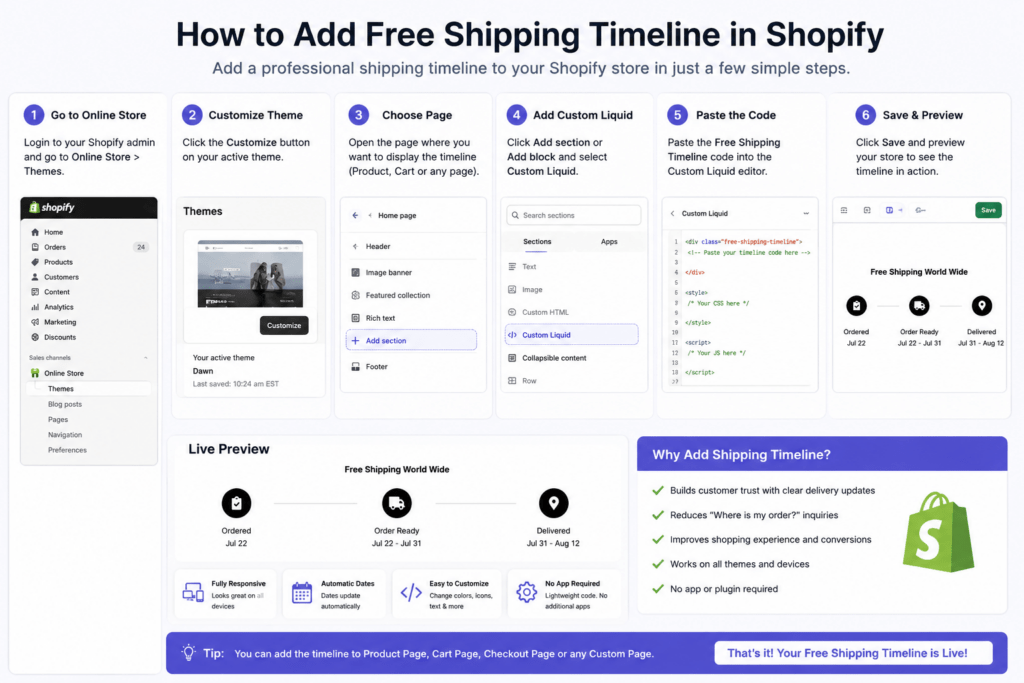
Adding the Free Shipping Timeline to your Shopify store is quick and doesn’t require any coding experience. Follow the steps below to display the timeline on your product page, cart page, or any custom page.
Method 1: Using the Custom Liquid Block (Recommended)
- Log in to your Shopify Admin.
- Go to Online Store → Themes.
- Click Customize on your active theme.
- Open the page where you want to display the timeline (Product, Cart, or Custom Page).
- Click Add Section or Add Block.
- Select Custom Liquid.
- Copy and paste the Free Shipping Timeline HTML, CSS, and JavaScript code into the Custom Liquid block.
- Click Save.
- Preview your store to ensure the timeline displays correctly on desktop and mobile devices.
Method 2: Using Theme Code
- Go to Online Store → Themes.
- Click ••• → Edit Code.
- Create a new section (for example,
free-shipping-timeline.liquid) or paste the code into an existing section such asmain-product.liquidorcart.liquid, depending on where you want the timeline to appear. - Save the file.
- Open the Theme Customizer and add the new section to your desired page.
- Save your changes and preview the storefront.
Customize the Timeline
You can easily personalize the timeline to match your store:
- 🚚 Change the heading text
- 🎨 Modify colors, fonts, and icons
- 📅 Adjust estimated shipping and delivery days
- 📍 Rename timeline stages (Ordered, Order Ready, Delivered)
- 📱 Optimize spacing for your theme layout
Why Add It to Shopify?
- ✅ Improves customer trust
- ✅ Displays estimated delivery dates automatically
- ✅ Enhances the shopping experience
- ✅ Works with most Shopify themes
- ✅ Fully responsive on desktop, tablet, and mobile
- ✅ No Shopify app or plugin required
- ✅ Lightweight and SEO-friendly code
After installation, your Free Shipping Timeline will automatically display a professional shipping progress tracker, helping customers understand when to expect their orders while improving your Shopify store’s overall user experience.
How to Add Free Shipping Timeline in WordPress
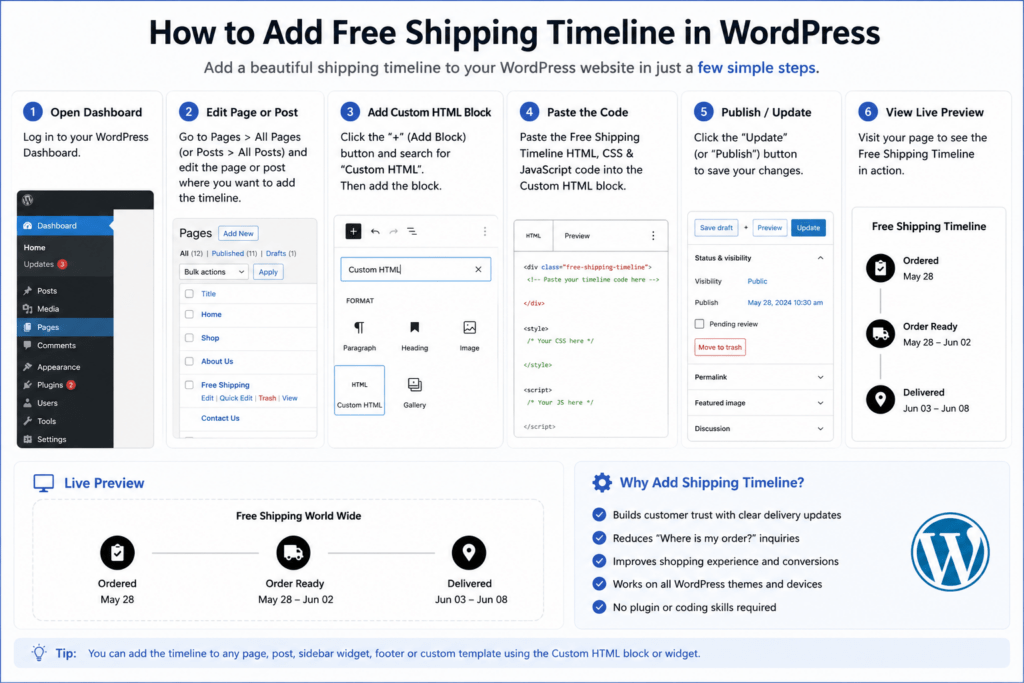
Adding the Free Shipping Timeline to your WordPress website is simple and takes just a few minutes. Whether you’re using the default WordPress editor or a page builder like Elementor, you can easily display the timeline on any page or post.
Method 1: WordPress Block Editor (Gutenberg)
- Log in to your WordPress Dashboard.
- Open the Page or Post where you want to display the timeline.
- Click the + (Add Block) button.
- Search for and select the Custom HTML block.
- Copy and paste the Free Shipping Timeline HTML, CSS, and JavaScript code into the block.
- Click Preview to check the timeline.
- Click Publish or Update to make it live.
Method 2: Elementor
- Open the page with Elementor.
- Drag and drop the HTML widget onto the page.
- Paste the Free Shipping Timeline code into the HTML widget.
- Click Update.
- Preview your page to ensure the timeline displays correctly.
Customize the Timeline
You can easily modify the timeline to match your website’s design by changing:
- 🎨 Colors and fonts
- 🚚 Timeline icons
- 📅 Estimated shipping and delivery days
- 📝 Heading and stage labels
- 📱 Spacing and layout for mobile devices
Why Add It to WordPress?
- ✅ Works with WordPress and WooCommerce
- ✅ No plugin required
- ✅ Fully responsive on all devices
- ✅ Lightweight HTML, CSS & JavaScript
- ✅ Easy copy-and-paste installation
- ✅ SEO-friendly and fast loading
- ✅ Compatible with most WordPress themes
Once installed, the Free Shipping Timeline provides customers with a clear visual overview of their order journey, improving trust, enhancing the shopping experience, and giving your WordPress website a more professional look.
Customization Guide
The Free Shipping Timeline is fully customizable, allowing you to match the design and branding of your Shopify, WordPress, or WooCommerce store. With just a few simple edits to the HTML, CSS, and JavaScript, you can personalize every part of the timeline without needing advanced coding skills.
You Can Easily Customize
🚚 Shipping Title
Update the main heading to match your store’s branding.
Examples:
- Free Shipping Worldwide
- Estimated Delivery
- Order Tracking
- Shipping Timeline
- Delivery Progress
🎨 Timeline Colors
Change the colors of:
- Timeline line
- Icons
- Background
- Text
- Active and completed steps
This helps the timeline blend seamlessly with your website’s design.
⭐ Icons
Replace the default Font Awesome icons with any icon that better represents your shipping process.
Examples:
- 📦 Package
- 🚚 Delivery Truck
- 🏠 Home Delivery
- ✔️ Completed
- 📍 Location Pin
📅 Estimated Delivery Days
Modify the JavaScript values to display your own shipping schedule.
Example:
- Order Ready: 2–5 Days
- Delivered: 5–10 Days
You can adjust the timeline based on your shipping policy.
🔤 Fonts
Use any font to match your website, including:
- Arial
- Poppins
- Roboto
- Open Sans
- Inter
- Montserrat
📱 Timeline Spacing
Adjust the spacing between:
- Timeline steps
- Icons
- Titles
- Dates
- Sections
This makes the layout fit perfectly on any page.
📲 Responsive Layout
The timeline is fully responsive, but you can further customize:
- Mobile spacing
- Icon size
- Font size
- Timeline width
- Tablet and desktop layout
Why Customize the Timeline?
- ✅ Match your brand identity
- ✅ Improve customer experience
- ✅ Increase trust with professional order tracking
- ✅ Display accurate shipping estimates
- ✅ Optimize the layout for all screen sizes
- ✅ Create a unique look without using additional plugins
With these customization options, you can quickly transform the Free Shipping Timeline into a fully branded shipping tracker that fits perfectly with your Shopify or WordPress store while providing customers with a clear and engaging delivery experience.