


If you’re looking for a modern and responsive Offer Slider Code for your Shopify or WordPress website, you’ve come to the right place. An attractive offer slider is one of the best ways to highlight discounts, special deals, and promotional campaigns without taking up too much space on your website.
In this tutorial, you’ll get a free Offer Slider Code built with HTML, CSS, and Shopify Liquid. It features smooth auto-scrolling animation, a clean and professional design, and a fully responsive layout that works perfectly on desktop, tablet, and mobile devices.
Whether you run an eCommerce store, a fashion brand, or any online business, this Offer Slider Code helps increase the visibility of your offers and encourages customers to take action. The code is lightweight, easy to customize, and can be added to almost any Shopify theme or WordPress website without requiring advanced coding knowledge.
In this guide, you’ll learn how to install the slider, customize the offer cards, change colors and text, and make it match your website’s branding. Simply copy the code, paste it into your website, and start showcasing your latest offers in a professional scrolling slider.
What is Offer Slider Code?
Offer Slider Code is a website component built with HTML, CSS, JavaScript, or Shopify Liquid that displays promotional offers in a smooth, scrolling slider. Instead of showing a single banner, it allows multiple offers, discounts, coupon codes, and special announcements to rotate automatically, making them more noticeable without taking up extra space on your website.
An Offer Slider Code is widely used on eCommerce websites such as Shopify and WordPress stores to promote limited-time deals, free shipping, seasonal sales, prepaid discounts, bundle offers, and exclusive coupon codes. Because the offers continuously scroll across the screen, visitors are more likely to notice them, increasing engagement and encouraging more purchases.
The Offer Slider Code provided in this tutorial is fully responsive, lightweight, and easy to customize. It works seamlessly on desktop, tablet, and mobile devices and can be integrated into most Shopify themes or WordPress websites with just a few simple steps. Whether you’re running a fashion store, electronics shop, or any online business, an offer slider is an effective way to showcase promotions while maintaining a clean and professional website design.
Features of this Offer Slider Code
Key Features
- 100% Responsive Design – Looks great on desktop, tablet, and mobile devices.
- Smooth Auto-Scrolling Animation – Displays offers continuously with a seamless infinite loop.
- Lightweight HTML & CSS Code – No heavy plugins or unnecessary libraries required.
- Shopify & WordPress Compatible – Easily integrate it into Shopify themes or WordPress websites.
- Easy to Customize – Change offer text, colors, fonts, spacing, and card styles with minimal effort.
- Modern Card Layout – Attractive offer cards with clean typography and professional styling.
- Infinite Loop Scrolling – Offers scroll continuously without visible breaks.
- Mobile-Friendly Performance – Optimized for fast loading and smooth animations on all screen sizes.
- Flexible Offer Management – Add, remove, or duplicate offer cards in just a few lines of code.
- Perfect for Promotions – Display discounts, coupon codes, free shipping, prepaid offers, bundle deals, festive sales, and limited-time promotions.
- SEO-Friendly Structure – Clean, organized code that is easy to maintain and integrate.
- Cross-Browser Compatible – Works smoothly in Chrome, Edge, Firefox, Safari, and other modern browsers.
- No Coding Experience Required – Simply copy, paste, and customize the code for your website.
- Professional eCommerce Design – Ideal for fashion stores, electronics stores, beauty brands, and other online businesses.
With this Offer Slider Code, you can highlight your latest promotions in a visually appealing way, improve customer engagement, and increase conversions without affecting your website’s performance.
Live Demo
Before adding this Offer Slider Code to your Shopify or WordPress website, you can preview how it works in real time. The live demo showcases the slider’s smooth auto-scrolling animation, responsive card layout, and modern design, helping you see exactly how it will appear on your website.
What You’ll See in the Live Demo
- ✅ Smooth infinite auto-scrolling animation
- ✅ Modern and professional offer card design
- ✅ Fully responsive layout for desktop, tablet, and mobile
- ✅ Promotional offer cards with attractive styling
- ✅ Lightweight and fast-loading performance
- ✅ Easy-to-read typography and clean spacing
- ✅ Seamless looping without interruptions
- ✅ Perfect for eCommerce stores, fashion brands, and online businesses
Demo Tip: Try viewing the slider on both desktop and mobile devices to experience its fully responsive design and smooth scrolling animation.
👇 Live Demo Preview

Paste the code below into your Shopify Custom Liquid section, WordPress Custom HTML block, or an online HTML editor to see the Offer Slider in action.
Offer Slider Code (HTML + CSS)
Below is the complete Offer Slider Code built with HTML, CSS, and Shopify Liquid. This responsive slider features a smooth auto-scrolling animation, modern offer cards, and a clean design that works perfectly on Shopify and WordPress websites.
The code is lightweight, easy to customize, and doesn’t require any third-party libraries or plugins. You can simply copy and paste it into your website to start displaying promotional offers, discounts, coupon codes, free shipping announcements, and seasonal sales.
<style>
  .active-offers-section {
    font-family: sans-serif;
    margin: 20px 0;
    overflow: hidden;
    position: relative;
  }

  .active-offers-title {
    font-size: 18px;
    font-weight: 700;
    margin-bottom: 10px;
  }

  .offers-container {
    display: flex;
    gap: 12px;
    animation: scrollLeft 40s linear infinite;
    width: max-content;
  }

  @keyframes scrollLeft {
    0% {
      transform: translateX(0%);
    }
    100% {
      transform: translateX(-50%);
    }
  }

  .offers-wrapper {
    overflow: hidden;
    width: 100%;
  }

  .offer-card {
    min-width: 200px;
    border: 1px solid #ccc;
    border-radius: 8px;
    flex-shrink: 0;
    background-color: #fff;
    box-shadow: 0 2px 5px rgba(0, 0, 0, 0.05);
  }

  .offer-header {
    background-color: #9b2b53;
    color: white;
    font-weight: 700;
    padding: 10px;
    font-size: 14px;
    border-top-left-radius: 8px;
    border-top-right-radius: 8px;
    text-align: center;
  }

  .offer-body {
    padding: 10px;
    font-size: 13px;
    text-align: center;
    color: #454545;
    font-weight: 400;
  }

  .offer-code {
    display: flex;
    justify-content: center;
    align-items: center;
    background-color: #f7f7f7;
    border-top: 1px dashed #ccc;
    padding: 8px;
    font-size: 13px;
    gap: 10px;
  }

  .offer-code button {
    background-color: transparent;
    border: none;
    color: #9b2b53;
    font-weight: 600;
    cursor: pointer;
    font-size: 13px;
    text-transform: capitalize;
  }

  span#code1 {
    color: #454545cc;
    font-size: 13px;
    font-weight: 600;
  }

  @media (max-width: 480px) {
    .offer-card {
      min-width: 180px;
    }

    .offer-header {
      font-size: 13px;
    }

    .offer-body {
      font-size: 12px;
    }

    .offer-code {
      font-size: 12px;
    }
  }

  /* Hide scrollbar for all browsers */
  .offers-wrapper::-webkit-scrollbar {
    display: none;
  }

  .offers-wrapper {
    -ms-overflow-style: none;
    scrollbar-width: none;
  }
</style>

<div class="active-offers-section">
  <div class="active-offers-title">Active Offers</div>
  <div class="offers-wrapper">
    <div class="offers-container">
      <!-- Duplicate cards once for seamless looping -->
           <!-- Offer 1 -->
        <div class="offer-card">
          <div class="offer-header">🌸 Flat 5% OFF on Prepaid Orders</div>
          <div class="offer-body">Save 5% on your full order! <b style="font-weight: 600; color: #454545;">₹499</b></div>
        </div>

        <!-- Offer 2 -->
        <div class="offer-card">
          <div class="offer-header">🐝 10% OFF on Prepaid Orders above ₹5,000</div>
          <div class="offer-body">Spend ₹5,000+ and enjoy an extra 10% savings prepaid!<b style="font-weight: 600; color: #454545;">₹999</b></div>
        </div>

        <!-- Offer 3 -->
        <div class="offer-card">
          <div class="offer-header">💎 Buy 5, Get Free Silver Jewellery</div>
          <div class="offer-body">Prepay and pick 5 products — we gift you elegant silver jewellery!<b style="font-weight: 600; color: #454545;">₹699</b></div>
        </div>

        <!-- Offer 4 -->
        <div class="offer-card">
          <div class="offer-header">🌸 Free Gucci Flora-Inspired Perfume</div>
          <div class="offer-body">Orders ₹7,000+ get a complimentary luxury Gucci-inspired perfume!<b style="font-weight: 600; color: #454545;">₹699</b></div>
        </div>

        <!-- Offer 5 -->
        <div class="offer-card">
          <div class="offer-header">🛒 Buy 2, Get 10% OFF (Prepaid Only)</div>
          <div class="offer-body">Add 2 styles prepaid and save instantly with 10% OFF!<b style="font-weight: 600; color: #454545;">₹699</b></div>
        </div>

        <!-- Offer 6 -->
        <div class="offer-card">
          <div class="offer-header">🎁 Buy 3, Get 1 Free (COD & Prepaid)</div>
          <div class="offer-body">Love 3? Get the 4th piece completely FREE — no conditions!<b style="font-weight: 600; color: #454545;">₹699</b></div>
        </div>

        <!-- Offer 7 -->
        <div class="offer-card">
          <div class="offer-header">🎉 Buy 3, Get 15% OFF (COD & Prepaid)</div>
          <div class="offer-body">Pick 3 or more, enjoy 15% OFF — bundle up & shine!<b style="font-weight: 600; color: #454545;">₹699</b></div>
        </div>
      {% endfor %}
    </div>
  </div>
</div>
How to Add Offer Slider Code in Shopify
You can easily add this Offer Slider Code to your Shopify store without installing any apps. The easiest method is to use Shopify’s Custom Liquid section, which works with most Shopify 2.0 themes. If your theme doesn’t support Custom Liquid, you can also add the code directly to your theme files.
Method 1: Add the Offer Slider Using Custom Liquid (Recommended)
- Log in to your Shopify Admin.
- Navigate to Online Store → Themes.
- Click Customize on your active theme.
- Open the page where you want to display the offer slider (for example, the Home page).
- Click Add Section.
- Select Custom Liquid.
- Copy the complete Offer Slider Code from this tutorial and paste it into the Custom Liquid editor.
- Click Save.
- Preview your store to make sure the slider displays correctly.
Method 2: Add the Offer Slider Using Theme Files
If your theme doesn’t have a Custom Liquid section, follow these steps:
- Go to Online Store → Themes.
- Click the ••• (three dots) next to your active theme and select Edit Code.
- Open the file where you want the slider to appear, such as:
theme.liquidindex.jsonmain-index.liquid- A custom section file
- Paste the Offer Slider Code in the desired location.
- Save your changes.
- Refresh your storefront to view the slider.
Customize Your Offer Slider
You can easily modify the slider to match your store’s branding:
- Edit the offer titles and descriptions.
- Change discount amounts and promotional text.
- Update colors, fonts, borders, and spacing.
- Add or remove offer cards.
- Adjust the scrolling speed by changing the animation duration in the CSS.
- Replace emojis with SVG icons or Font Awesome icons if preferred.
Test Before Publishing
After adding the Offer Slider Code, check the following:
- ✔ Smooth auto-scrolling animation
- ✔ Responsive layout on desktop, tablet, and mobile
- ✔ Proper spacing between offer cards
- ✔ Correct offer text and pricing
- ✔ Fast loading performance
- ✔ No layout or styling issues
Once everything is working correctly, save your changes and publish your Shopify store. Your Offer Slider Code will now display eye-catching promotions, helping you increase customer engagement and improve conversions.
How to Add Offer Slider Code in WordPress
Adding this Offer Slider Code to your WordPress website is simple and doesn’t require any additional plugins. You can insert the code using the Custom HTML block in the Gutenberg editor, the HTML widget, or the HTML element in page builders like Elementor.
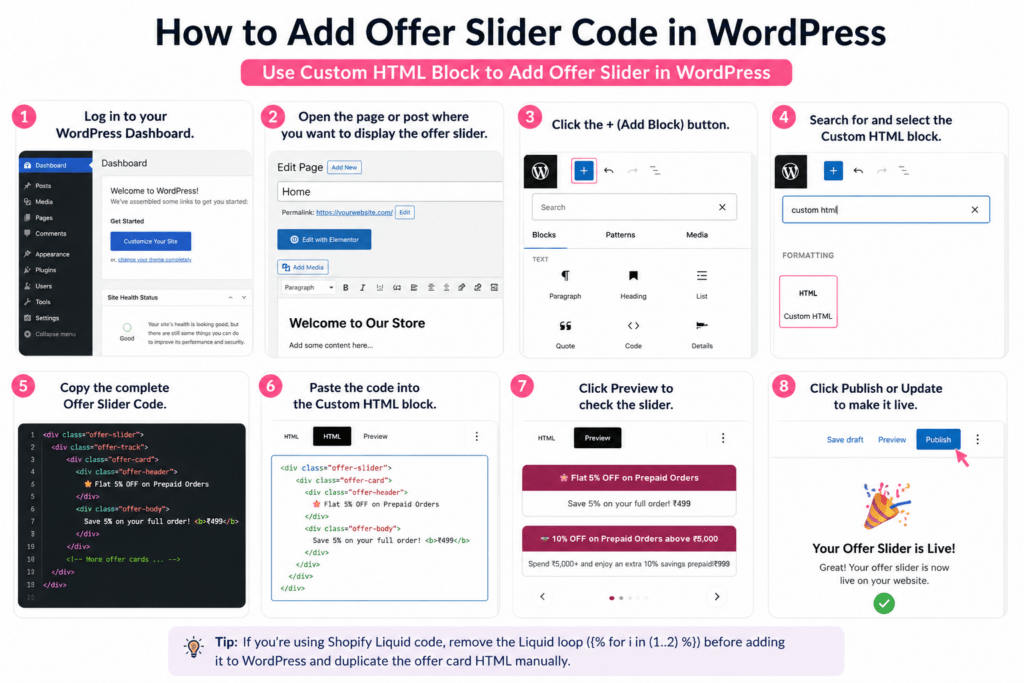
Method 1: Add Using the Custom HTML Block (Recommended)
- Log in to your WordPress Dashboard.
- Open the page or post where you want to display the offer slider.
- Click the + (Add Block) button.
- Search for and select the Custom HTML block.
- Copy the complete Offer Slider Code from this tutorial.
- Paste the code into the Custom HTML block.
- Click Preview to check the slider.
- Click Publish or Update to make it live.
Method 2: Add Using Elementor
If you’re using Elementor, follow these steps:
- Open the page with Edit with Elementor.
- Drag the HTML widget onto your page.
- Paste the complete Offer Slider Code into the widget.
- Click Update to save your changes.
- Preview the page to ensure the slider works correctly.
Method 3: Add Using a Widget Area
To display the slider in your sidebar, footer, or another widget area:
- Go to Appearance → Widgets.
- Add a Custom HTML widget to your desired widget area.
- Paste the Offer Slider Code.
- Save the widget and preview your website.
Important Note for WordPress Users
The original code includes a Shopify Liquid loop:
WordPress does not support Shopify Liquid syntax. Before using the code in WordPress:
- Remove the Liquid loop.
- Manually duplicate the offer cards once or twice to create the same seamless scrolling effect.
Customize the Offer Slider
You can easily personalize the slider by:
- Changing offer titles and descriptions.
- Updating discount percentages and pricing.
- Modifying colors, fonts, borders, and spacing.
- Adding or removing offer cards.
- Adjusting the scrolling speed in the CSS animation.
- Replacing emojis with icons if desired.
Test Before Publishing
Before making the slider live, verify that:
- ✔ The slider scrolls smoothly.
- ✔ It displays correctly on desktop, tablet, and mobile devices.
- ✔ All offer cards are fully visible.
- ✔ Text is clear and readable.
- ✔ The design matches your website’s branding.
- ✔ There are no layout or styling issues.
Once you’ve completed these steps, your Offer Slider Code will be ready to showcase discounts, special offers, coupon codes, and promotional campaigns on your WordPress website in a professional and engaging way.
Customize Offer Cards
One of the biggest advantages of this Offer Slider Code is how easy it is to customize. You can quickly edit the offer cards to match your brand, update promotional campaigns, or create seasonal offers without changing the overall design.
Change the Offer Title
The offer title is displayed at the top of each card. Simply replace the existing text inside the offer-header class.
Example:
- 🎉 Flat 20% OFF on All Orders
- 🚚 Free Shipping on Orders Above ₹999
- 🎁 Buy 2, Get 1 Free
- 💳 Extra 10% OFF on Prepaid Orders
Update the Offer Description
Edit the content inside the offer-body class to describe your promotion.
Examples:
- Save 20% on your first purchase.
- Get free shipping on orders over ₹999.
- Buy any 2 products and get 1 absolutely free.
- Enjoy an extra discount when you pay online.
Change Colors
You can easily change the card colors by editing the CSS.
Customize:
- Header background color
- Text color
- Card background
- Border color
- Shadow effect
This allows you to match the slider with your website’s branding.
Add or Remove Offer Cards
Need more promotions?
Simply duplicate an existing offer-card block and update the content.
If you want fewer offers, delete any unwanted offer-card section.
Change Scrolling Speed
The scrolling speed is controlled by the CSS animation.
Increase the animation duration for slower scrolling or decrease it for faster movement.
Replace Emojis with Icons
Instead of emojis, you can use:
- SVG Icons
- Font Awesome Icons
- Bootstrap Icons
- Custom Brand Icons
This gives your slider a more professional appearance.
Customize Fonts
You can easily modify:
- Font family
- Font size
- Font weight
- Text alignment
- Letter spacing
to match your website’s typography.
Mobile Optimization
The slider is already fully responsive, but you can also customize:
- Card width
- Padding
- Font size
- Gap between cards
- Border radius
for an even better mobile experience.
Best Practices
To improve user experience and conversions:
- Keep offer titles short and attention-grabbing.
- Highlight the most valuable discount.
- Use consistent brand colors.
- Avoid overcrowding the slider with too many offers.
- Test the slider on desktop, tablet, and mobile devices.
- Update your offers regularly for seasonal sales and special promotions.
With just a few simple edits, you can transform this Offer Slider Code into a fully branded promotional slider that enhances your website’s appearance and encourages more customers to take advantage of your latest offers.
Change Offer Text & Colors
One of the best features of this Offer Slider Code is its flexibility. You can easily change the offer text, colors, fonts, and styling to match your website’s branding and current promotions. Whether you’re running a seasonal sale, festival offer, or limited-time discount, updating the slider takes only a few minutes.
Change the Offer Text
Each offer card contains a title and description. Simply replace the existing text with your own promotional content.
You can update:
- Offer title
- Discount percentage
- Coupon code
- Minimum order value
- Promotional message
- Free shipping details
- Product offers
Example Offer Titles
- 🎉 Flat 20% OFF on All Orders
- 🚚 Free Shipping on Orders Above ₹999
- 💳 Extra 10% OFF on Prepaid Orders
- 🎁 Buy 2 Get 1 Free
- 🔥 Limited Time Flash Sale
Change the Header Color
The header background color is controlled in the CSS using the .offer-header class.
You can replace the default color with your brand color.
Example Colors
- Purple (#9b2b53)
- Blue (#2563eb)
- Green (#16a34a)
- Orange (#ea580c)
- Black (#111827)
Change the Card Background
Modify the .offer-card CSS to update:
- Background color
- Border color
- Border radius
- Box shadow
This allows you to create a modern, premium, or minimal design.
Change Text Colors
You can customize:
- Header text color
- Offer description color
- Price highlight color
- Button text color
Choose colors that provide good contrast for better readability.
Change Fonts
Update the font styles to match your website.
You can modify:
- Font family
- Font size
- Font weight
- Text alignment
- Line height
Update the Button Style
If your slider includes a copy code or action button, you can customize:
- Button text
- Background color
- Hover effect
- Border radius
- Font size
- Padding
Match Your Brand Identity
For a professional look, use:
- Your brand colors
- Consistent typography
- Matching button styles
- Uniform spacing
- High-contrast text for accessibility
Tips for Better Conversions
- Highlight your most valuable offer.
- Keep promotional text short and easy to read.
- Use bold colors to draw attention to important discounts.
- Update offers regularly for festive sales, flash sales, and seasonal campaigns.
- Preview your changes on desktop and mobile before publishing.
With just a few simple edits, you can personalize this Offer Slider Code to perfectly match your brand while creating eye-catching promotions that encourage visitors to explore your offers and complete more purchases.
Buy on Amazon – Best Price
Looking for the best deal? Click the button below to check the latest price, customer reviews, ratings, and availability on Amazon. As an Amazon Associate, we may earn a small commission from qualifying purchases at no extra cost to you.