

Introduction
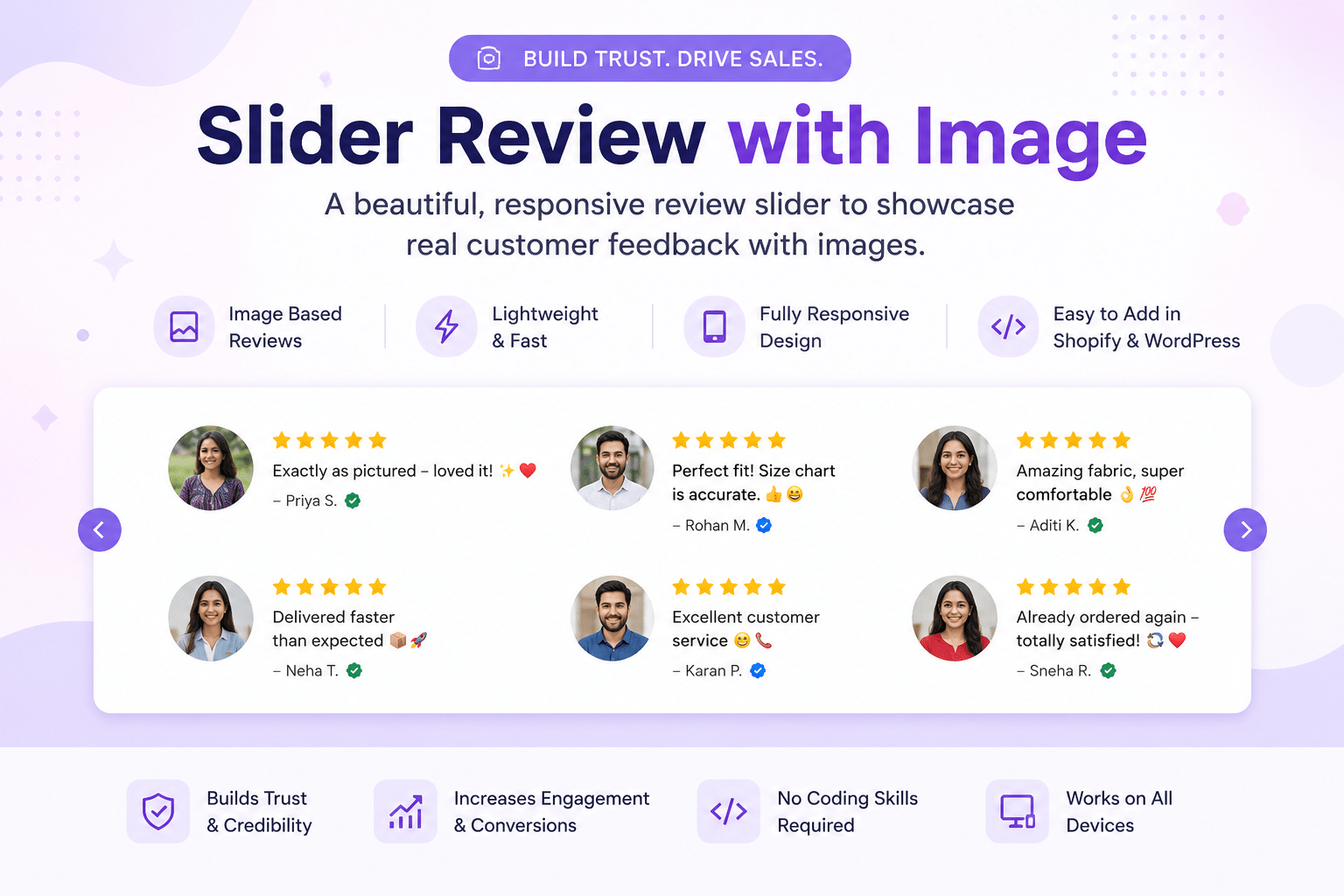
When visitors land on your online store, they make a decision within seconds—whether to trust your brand or leave. One of the easiest ways to build credibility is by displaying real customer feedback in a slider review with image.
Instead of showing plain text testimonials, a review slider that includes customer photos immediately grabs attention and increases confidence. Visitors naturally trust visual reviews more because they feel authentic and relatable.
Whether you’re running a Shopify fashion store, a WordPress WooCommerce website, or any eCommerce business, adding an animated review slider can significantly improve your website’s user experience and conversion rate.
In this guide, you’ll learn everything about implementing a responsive slider review with image, why it matters, its benefits, customization options, installation steps for Shopify and WordPress, and best practices for getting the highest engagement.
Why Use a Slider Review with Image?
Modern shoppers rarely purchase products without checking customer reviews.
According to industry research, customers are far more likely to trust reviews that include real customer images than plain text testimonials.
A review slider offers several advantages:
- Creates instant social proof
- Makes your website more professional
- Increases customer trust
- Keeps visitors engaged longer
- Encourages higher conversion rates
- Improves the visual appearance of product pages
- Displays multiple reviews without taking too much space
Instead of displaying long review sections, a moving slider presents testimonials in an attractive and interactive format.
What Makes This Review Slider Different?
Unlike many heavy review plugins, this slider is built using lightweight HTML and CSS.
Key Features
✅ Responsive Design
Works perfectly on:
- Desktop
- Laptop
- Tablet
- Mobile
✅ Customer Images
Every review includes a circular profile image that makes testimonials look authentic.
✅ Infinite Animation
Reviews continuously scroll across the screen without interruption.
✅ Dual Scrolling Rows
The first row moves left to right.
The second row moves right to left.
This creates a premium-looking animation similar to high-end eCommerce stores.
✅ Lightweight Performance
No jQuery.
No external libraries.
Minimal CSS.
Fast loading speed.
✅ Easy Customization
You can easily change:
- Customer images
- Review text
- Animation speed
- Profile image size
- Colors
- Font size
- Row spacing
- Mobile responsiveness
Slider Review with Image Features Comparison
| Feature | This Slider | Typical Review Plugin |
|---|---|---|
| Customer Images | ✅ | ✅ |
| Infinite Animation | ✅ | Sometimes |
| Lightweight | ✅ | ❌ |
| Mobile Responsive | ✅ | ✅ |
| No JavaScript Required | ✅ | ❌ |
| Free | ✅ | Often Paid |
| Easy Customization | ✅ | Medium |
| Shopify Compatible | ✅ | ✅ |
| WordPress Compatible | ✅ | ✅ |
How This Slider Works


Perfect fit! Size chart is accurate. 👍😄

Exactly as pictured—loved it! ✨❤️

Already ordered again—totally satisfied! 🔄❤️

Delivered faster than expected 📦🚀

Excellent customer service 😊📞

Amazing fabric, super comfortable 👌💯
The code consists of three simple parts.
<style>
  * {
    margin: 0;
    padding: 0;
    box-sizing: border-box;
  }

  .custom-reviews-container {
    overflow: hidden;
    padding: 30px 0;
    background-color: #fff;
  }

  .custom-reviews-row {
    overflow: hidden;
    margin-bottom: 30px;
  }

  .custom-reviews-slider {
    display: flex;
    align-items: center;
    width: max-content;
  }

  .left-to-right {
    animation: scroll-left-right 40s linear infinite;
  }

  .right-to-left {
    animation: scroll-right-left 40s linear infinite;
  }

  .custom-review-item {
    display: flex;
    align-items: center;
    gap: 15px;
    min-width: 300px;
    padding: 0 50px;
    white-space: nowrap;
    flex-shrink: 0;
  }

  .custom-review-item img {
    width: 60px;
    height: 60px;
    border-radius: 50%;
    object-fit: cover;
    flex-shrink: 0;
  }

  .custom-review-item p {
    font-size: 14px;
    line-height: 1.4;
    color: #333;
  }

  @keyframes scroll-left-right {
    0% {
      transform: translateX(-50%);
    }

    100% {
      transform: translateX(0);
    }
  }

  @keyframes scroll-right-left {
    0% {
      transform: translateX(0);
    }

    100% {
      transform: translateX(-50%);
    }
  }

  @media(max-width: 600px) {
    .custom-review-item {
      min-width: 250px;
      padding: 0 30px;
    }

    .custom-review-item img {
      width: 50px;
      height: 50px;
    }

    .custom-review-item p {
      font-size: 13px;
    }
  }
</style>

<div class="custom-reviews-container">

  <!-- Row 1: Left to Right -->
  <div class="custom-reviews-row">
    <div class="custom-reviews-slider left-to-right">
      {% for i in (1..2) %}
      <div class="custom-review-item">
        <img src="https://cdn.shopify.com/s/files/1/0685/8991/2241/files/photo_2025-03-2616.44.01.jpg?v=1742987694" alt="Review 1">
        <p>Perfect fit! Size chart is accurate. 👍😄</p>
      </div>
      <div class="custom-review-item">
        <img src="https://cdn.shopify.com/s/files/1/0685/8991/2241/files/photo_2025-03-2616.43.52.jpg?v=1742987694" alt="Review 2">
        <p>Exactly as pictured—loved it! ✨❤️</p>
      </div>
      <div class="custom-review-item">
        <img src="https://cdn.shopify.com/s/files/1/0685/8991/2241/files/photo_2025-03-2616.19.00.jpg?v=1742986201" alt="Review 3">
        <p>Already ordered again—totally satisfied! 🔄❤️</p>
      </div>
      {% endfor %}
    </div>
  </div>

  <!-- Row 2: Right to Left -->
  <div class="custom-reviews-row">
    <div class="custom-reviews-slider right-to-left">
      {% for i in (1..2) %}
      <div class="custom-review-item">
        <img src="https://cdn.shopify.com/s/files/1/0685/8991/2241/files/photo_2025-03-2616.18.56.jpg?v=1742986201" alt="Review 4">
        <p>Delivered faster than expected 📦🚀</p>
      </div>
      <div class="custom-review-item">
        <img src="https://cdn.shopify.com/s/files/1/0685/8991/2241/files/photo_2025-03-2616.13.56.jpg?v=1742985875" alt="Review 5">
        <p>Excellent customer service 😊📞</p>
      </div>
      <div class="custom-review-item">
        <img src="https://cdn.shopify.com/s/files/1/0685/8991/2241/files/photo_2025-03-2616.13.48.jpg?v=1742985876" alt="Review 6">
        <p>Amazing fabric, super comfortable 👌💯</p>
      </div>
      {% endfor %}
    </div>
  </div>

</div>
1. CSS Styling
The CSS controls:
- Layout
- Profile image size
- Responsive design
- Animation
- Colors
- Spacing
2. HTML Structure
Each review contains:
- Customer Image
- Review Text
Example:
Customer Image

⭐⭐⭐⭐⭐

Perfect fit! Size chart is accurate.
Each review item is repeated automatically to create an endless scrolling effect.
3. Animation
Two CSS animations create the movement.
Row One
Moves Left → Right
Row Two
Moves Right → Left
The opposite movement creates a modern premium appearance.
Benefits for Shopify Stores
If you own a Shopify store, this review slider is an excellent addition because it:
- Improves homepage engagement
- Increases trust for new visitors
- Displays social proof above the fold
- Works with any Shopify theme
- Loads quickly
- Doesn’t affect store speed significantly
Perfect for:
- Fashion Stores
- Electronics
- Beauty Products
- Home Decor
- Jewelry
- Accessories
- Print-on-Demand Stores
Benefits for WordPress Websites
WordPress users can easily place this review slider inside:
- Elementor
- Gutenberg
- WPBakery
- Divi
- Custom HTML Block
- WooCommerce Product Pages
It works independently without requiring any plugin.
Customization Options
One of the biggest advantages of this slider is flexibility.
You can customize almost everything.
| Element | Editable |
|---|---|
| Customer Images | ✅ |
| Review Text | ✅ |
| Animation Speed | ✅ |
| Background Color | ✅ |
| Font Size | ✅ |
| Image Size | ✅ |
| Padding | ✅ |
| Row Direction | ✅ |
| Mobile Layout | ✅ |
How to Add in Shopify
Adding this review slider to Shopify is simple.

Step 1
Go to
Online Store → Themes
Step 2
Click
Customize
Step 3
Add a
Custom Liquid
section.
Step 4
Paste the complete code.
Step 5
Save the changes.
Your review slider is now live.
How to Add in WordPress

Step 1
Open your WordPress Dashboard.
Step 2
Edit any page or post.
Step 3
Insert a
Custom HTML
block.
Step 4
Paste the slider code.
Step 5
Update or Publish the page.
Done!
Best Practices
For maximum effectiveness, follow these tips:
Use Real Customer Photos
Avoid stock images.
Authentic photos build stronger trust.
Keep Reviews Short
Ideal review length:
10–20 words.
Highlight Positive Experiences
Examples:
- Fast Delivery
- Premium Quality
- Great Customer Support
- Comfortable Fit
- Excellent Packaging
Optimize Images
Use compressed images.
Recommended size:
200×200 px
This improves loading speed.
Match Brand Colors
Customize fonts and spacing to match your website design.
Consistency creates a premium look.
SEO Benefits
A slider review with image can also contribute to your site’s SEO when implemented thoughtfully.
Improves User Engagement
Visitors spend more time viewing dynamic testimonials.
Reduces Bounce Rate
Engaging elements encourage users to explore more pages.
Builds Trust
Higher trust often leads to better conversion rates, which can indirectly support SEO performance.
Mobile-Friendly Experience
Responsive design improves usability across devices.
Common Mistakes to Avoid
❌ Using blurry images
❌ Displaying fake testimonials
❌ Making animations too fast
❌ Overloading the page with too many reviews
❌ Ignoring mobile responsiveness
❌ Forgetting image alt text
Who Should Use This Slider?
This review slider is ideal for:
- Shopify Store Owners
- WooCommerce Stores
- Small Businesses
- Fashion Brands
- Beauty Stores
- Electronics Shops
- Furniture Stores
- Digital Product Sellers
- Agencies
- Freelancers
- Landing Pages
If your goal is to increase customer confidence without slowing down your website, this lightweight solution is an excellent choice.
Why We Recommend This Slider
After testing several review display methods, this animated image-based slider consistently delivers a cleaner look and better engagement than static testimonial blocks. Because it uses only HTML and CSS, it remains lightweight, easy to maintain, and compatible with most Shopify themes and WordPress page builders. It also gives you full control over the design without relying on expensive third-party apps.
Conclusion
A well-designed slider review with image is more than just a decorative feature—it is a powerful trust-building tool that can improve user engagement, showcase customer satisfaction, and support higher conversions. Whether you use Shopify or WordPress, this responsive HTML and CSS solution is simple to implement, highly customizable, and optimized for performance.
By using real customer photos, concise testimonials, and smooth animations, you can create a more engaging shopping experience that encourages visitors to become customers. Start with the provided code, customize it to match your brand, and watch your testimonials become one of the most persuasive sections of your website.
Frequently Asked Questions (FAQs)
Is this review slider mobile responsive?
Yes. It automatically adjusts image sizes, spacing, and typography for mobile devices.
Does it work with Shopify?
Absolutely. You can paste the code into a Custom Liquid section or embed it within your theme.
Can I use it in WordPress?
Yes. Simply add the code to a Custom HTML block, Elementor HTML widget, or your theme template.
Can I change the animation speed?
Yes. Modify the CSS animation duration (for example, 40s) to make the slider faster or slower.
Do I need any plugins?
No. This solution is built with HTML and CSS only, so no additional plugins or JavaScript libraries are required.